In this part, we’ll add markdown rendering to our terminal agent. LLMs return responses in markdown, so we need a way to display formatted text—bold, italic, headers, code, and more—all using ANSI escape codes.
Let’s get started.
How terminals render colors?
Terminals don’t understand HTML or CSS. Instead, they use ANSI escape codes to apply colors and styles to text. These are special character sequences that tell the terminal “make the next text bold” or “color this red.”
The basic structure is simple:
1
\033[<code>m<text>\033[0m
Where:
\033[ is the escape sequence (also written as \x1b[ or \e[)
<code> is a number representing a style or color
m marks the end of the escape sequence
<text> is your actual content
\033[0m resets back to default styling
Here are the most useful codes:
Text Colors:
31 = Red
32 = Green
33 = Yellow
34 = Blue
35 = Magenta
36 = Cyan
Styles:
0 = Reset all formatting
1 = Bold
2 = Dim
3 = Italic
4 = Underline
You can combine multiple codes by separating them with semicolons. For example, \033[1;31m produces bold red text.
Let’s see it in action:
1
2
$ echo -e "\033[1;32mBold Green Text\033[0m"Bold Green Text # (but in bold and green!)
Creating an ANSI namespace
Before we dive into markdown rendering, let’s create a dedicated namespace for ANSI formatting. This will give us a clean, reusable way to apply colors and styles.
(ns termagent.ansi)(def codes{:reset"\033[0m":bold"\033[1m":dim"\033[2m":italic"\033[3m":underline"\033[4m":red"\033[31m":green"\033[32m":yellow"\033[33m":blue"\033[34m":magenta"\033[35m":cyan"\033[36m":white"\033[37m"})(defn render"Renders text with ANSI codes. Takes a vector [style text] or [style1 style2 ... text]
where styles are keywords and text is a string."[v](if (vector? v)(let [styles(butlast v)text(last v)style-codes(apply str (map codesstyles))](str style-codestext(:resetcodes)))v))
The render function takes a vector where the last element is the text, and everything before it are style keywords. Let’s see it in action:
$ clj -M:run
User: Hello
Assistant:
Hello! How can I assist you today?
The markdown renderer
Now let’s create the markdown renderer. The approach is simple:
Use regex patterns to match markdown syntax
Replace matches with text wrapped in ANSI codes
Always reset formatting after each element
We’re using regex because of its simplicity. You could use a complete markdown parser that handles corner cases and more complex elements, but since the focus here is learning, regex keeps things straightforward.
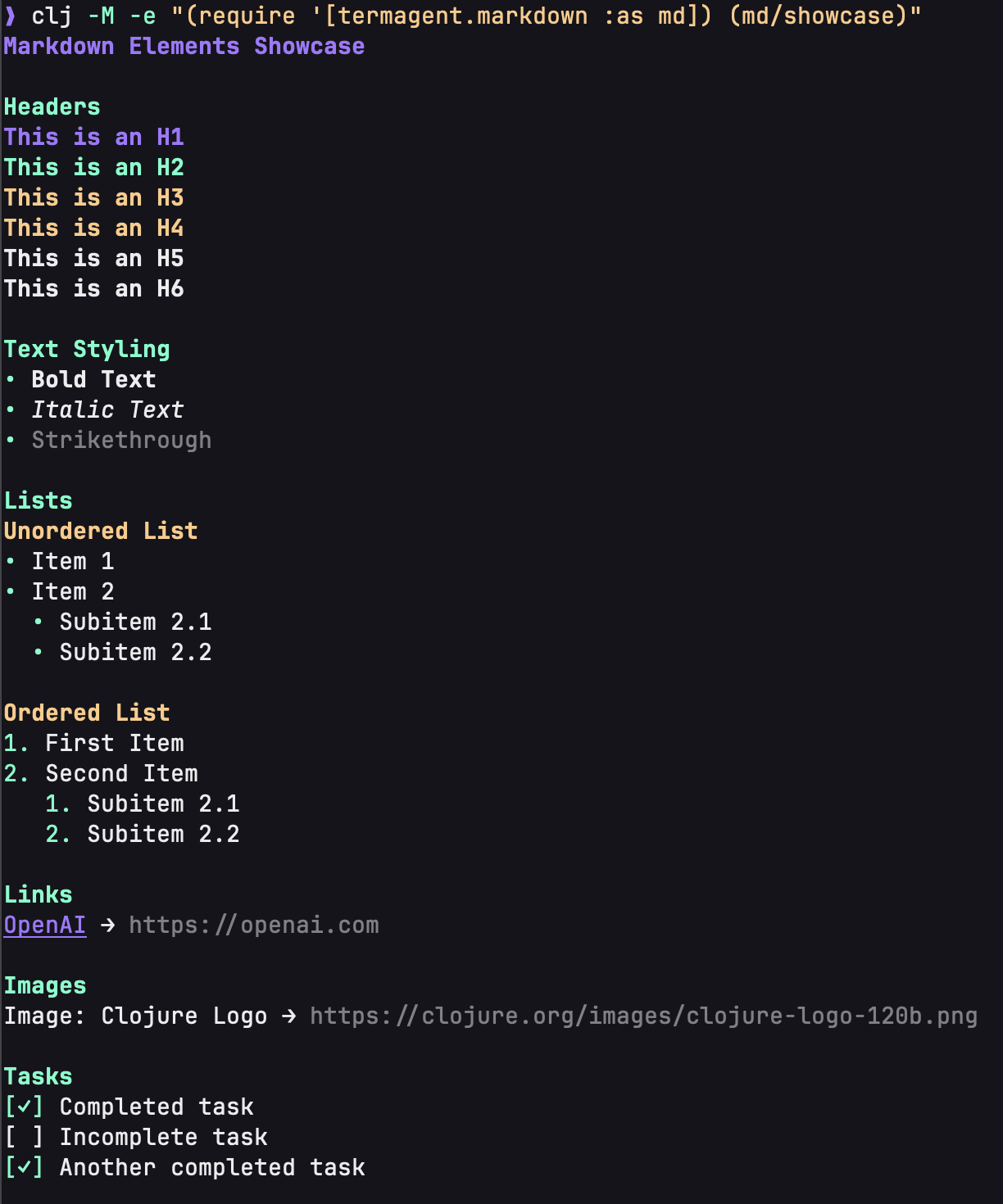
(defn showcase"Demonstrates all markdown rendering features.
Run with: clj -M -e \"(require '[termagent.markdown :as md]) (md/showcase)\""[](let [sample-text"# Markdown Elements Showcase
## Headers
# This is an H1
## This is an H2
### This is an H3
#### This is an H4
##### This is an H5
###### This is an H6
## Text Styling
- **Bold Text**
- *Italic Text*
- ~~Strikethrough~~
## Lists
### Unordered List
- Item 1
- Item 2
- Subitem 2.1
- Subitem 2.2
### Ordered List
1. First Item
2. Second Item
1. Subitem 2.1
2. Subitem 2.2
## Links
[OpenAI](https://openai.com)
## Images

## Tasks
- [x] Completed task
- [ ] Incomplete task
- [X] Another completed task
## Code
Here is some `inline code` example.
## Blockquotes
> This is a blockquote with important information.
## Horizontal Rule
---
End of showcase."](println (rendersample-text))))
$ clj -M:run
User: Explain what Clojure is
Assistant:
# ClojureClojure is a **modern, functional programming language** that runs on the `Java Virtual Machine`(JVM).
It was created by *Rich Hickey* in 2007.
## Key Features- Immutable data structures
- First-class functions
- Lisp syntax
> Clojure encourages a functional programming style.
Learn more at [clojure.org](https://clojure.org).
What We’ve Built
You now have:
ANSI escape codes for terminal styling
A reusable ANSI namespace
A markdown renderer that supports:
Headers (H1-H6)
Text styling (bold, italic, strikethrough)
Links and images
Task items
Lists
Blockquotes
Inline code
Horizontal rules
Markdown rendering integrated into your agent
Colored prompts
What’s Next
Our renderer handles most common markdown elements, but we’re still missing one: code blocks with syntax highlighting. In the next part, we’ll add syntax highlighting for different languages using regex patterns.